If you have an iOS device, then you already know one of the main features is theMessages app. On iPhone, it serves as an iMessage and SMS platform; on iPod touch and iPad, it serves as an iMessage platform only. Nevertheless, you can even use your iCloud account to sync your SMS messages with all your devices across the board.
Despite how useful it is to be able to message anyone on demand from any of these devices,jailbreakinghas opened many doors for incredible functionality for the Messages app that Apple has yet to implement in iOS in its stock form.

In this roundup, we’ll be showing you some of our favorite jailbreak tweaks foriOS 9that enhance the messaging experience in Apple’s mobile operating system.
Our favorite iOS 9 tweaks for the Messages app
We’re not putting these in any specific order because they’re not really in any direct competition with one another, but these tweaks all compliment the iOS 9 jailbreak experience nicely for anyone who does a lot of text messaging.
Remote Messages – $3.99
Among one of my all-time favorites isRemote Messages. This tweak lets you use iMessage on unsupported operating systems, such as Windows and Linux, through your web browser.
All you have to do is install the tweak on your iPhone and then visit a special URL in your computer’s web browser to see your conversations in an intelligent web app user interface.

All of the features you would expect in an iOS-based messaging client will be there; this includes typing indicators, reach receipts, Emojis, attachment sending/viewing, and more.
Couria – Free
Because there’s nobiteSMSfor iOS 9, there has been a huge lull in jailbreaking for those who expect more from their Messages app. Fortunately, Couria is a great jailbreak tweak, which is free of cost, that allows you to extend the quick reply and quick compose features of iOS 9.
The tweak lets you see message conversation history right from your notification banners without the need to launch the Messages app, and even includes a super sleek and customizable interface. The developer has also taken his time to integrate an API that allows several other third-party jailbreak tweaks to stay compatible with this beastly tweak.

It’s hard not to recommend Couria, but if you want to learn more, check out ourfull review.
SwitchService – Free
Another tweak that rose from the ashes of biteSMS was SwitchService, which is a useful free jailbreak tweak that lets you easily choose whether your message gets sent to the recipient as an SMS message or an iMessage.
The tweak is used by tapping and holding on the Send button, and doing so toggles between the two types of messaging services you can access in the Messages app.
For more information on the tweak and its availability in Cydia, you can check out ourfull review.
TypeStatus 2 – Free

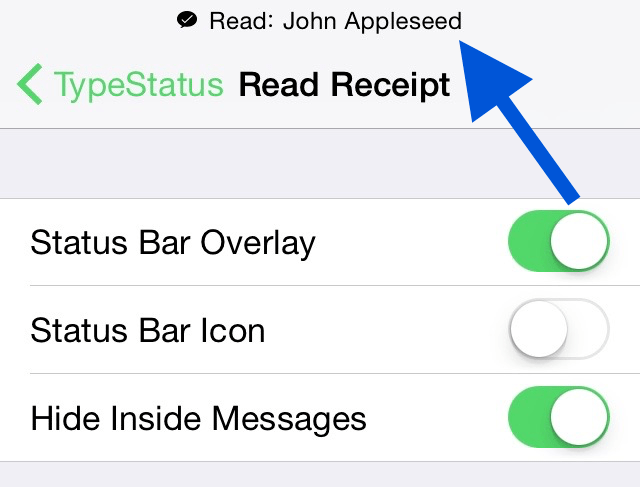
TypeStatus is a great tweak that lets you see when others have read your iMessages or are typing to you right from your iOS device’sStatus Bar.
The tweak displays icon and a notification in the Status Bar whenever someone is typing to you via iMessage, which can be useful to know if you’re not hawk-eyeing the Messages app and still want to know when someone is replying to you. Notably, the tweak is not SMS-compatible, as iMessage is the only service that provides read receipts and typing statuses.
To learn more about the inner workings of TypeStatus, check out ourfull review.
Nuntius – $1.49
For those looking to add useful functionality to their Messages app in a single jailbreak tweak package, Nuntius is another great option.
This tweak lets you have any of the following features:
The tweak goes a long way to make the functions of the Messages app more useful than before in terms of privacy, troubleshooting, forgetfulness, and speed on top of customization.
For more information on Nuntius, check out ourfull reviewand watch ourdemo video.
CKCounter – Free
CKCounter is a simple but wonderful addition to the Messages app on jailbroken devices. It allows you to keep track of how many messages are in each conversation list in your Messages app, whether they’re iMessage or SMS conversations.
The counter is displayed to the right of the names on the conversations, and the number itself can be colorized to any setting you would like.
To learn more about CKCounter and how it works, read all about it in ourfull review.
Wrapping up
These are some of the most noteworthyjailbreak tweaksfor modifying the iOS 9 Messages app. There may be others, so if we’ve missed any that you really like, let us know in the comments and tell us why you like it!
Also read:12 great 3D Touch jailbreak tweaks
Are you using any of the above jailbreak tweaks to modify your iOS 9 Messages app? Share below!
